Signal Private Messenger: What Parents Need to Know
Signal Messenger is a free private messaging app that promotes itself as one of the most secure ways to communicate. With end-to-end encryption and disappearing messages, it promises privacy, but that same privacy can make it harder for parents to know what’s happening online. Before deciding whether Signal is right for your family, here’s what you should know about how the app works, why teens are drawn to it, and the potential risks to be aware of.
What is the Signal app?
- The Signal app is a free, secure messaging app (previously called TextSecure)
- It’s available in the iOS App Store, Google Play, and on Chrome
- Users can text, have group chats, and make free voice calls and video calls (nationally and internationally)
- The app promises end-to-end encryption for all communication so only the sender and recipient can access messages
- The app’s developer is a 501c3 nonprofit and there are no in-app purchases available
- The company says it doesn’t collect metadata on its users (this includes a user’s identity and location)
- The app asks for permission to access the user’s contacts
- Users can set the Signal app to make all messages automatically disappear (anywhere from 1 second later to 4 weeks after the message was read)
- Signal app users can take screenshots of messages they receive before they disappear, just like on Snapchat
Top Concerns of the Signal App
- Using any private messaging app could lead to negative behavior because students might feel they can hide their actions from their parents
- Some teens might post riskier content on the Signal app than they would post on other social networks. This is because messages disappear and aren’t meant to be permanent
- Sometimes kids use apps like this to hide activity from their parents' phone bill
What can parents do?
- Parents can chat with their kids about the Signal app to decide if it's a good fit for their family
- Teach teens what is and is not appropriate to share with others online
- Remind your students that messages and photos never truly disappear. Others may take screenshots or videos of their messages
Why do students want to be on the Signal App?
- The Signal Messenger App provides students with a sense of privacy because of the use of disappearing messages and end-to-end encryption
- The app can send messages, calls, and photos to others
- Users can set messages to disappear at any interval they want, from 1 second to 4 weeks
- There are no hidden fees inside the app, but the app does use its own cryptocurrency called MobileCoin
What is the Signal App rated?
Additional info: (Based in Mountain View, CA, Owned by Signal Foundation)
Apple App Store Rating: 13+
Google Play Rating: E (Everyone)
The Signal App in the News
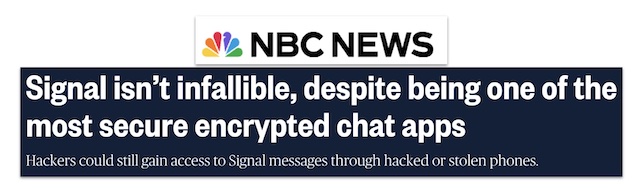
Just because Signal protects messages in transit doesn’t mean it protects its users from other types of snooping. - NBC News
Conclusion
The Signal app is in the SmartSocial Red Zone because we don't recommend it for teens and tweens. As parents and educators, you can’t completely control what students are doing on their phones or computers. But you can keep the dialogue open about the ways they should act responsibly online. Always encourage good digital behavior so they don't have to rely on an app that deletes everything they write.
Additional Resources
Best Chat Apps: What Parents, Educators, & Students Need to Know
You're not logged in!
Log in or join to protect your family and enter for a chance to win cool prizes
Become a member or log in to learn more on this topic

This is great info, thanks for giving me some ideas on how to start a dialogue with my teen!

Sharon M.
Parent VIP Member
Josh's presentation about social media was unbelievably fantastic. Our students learned so much about what kids should and shouldn't be doing. The fact that it is such a thoughtful process made it all worthwhile.
Director of College Advising
Educator Webinar Attendee
This webinar is a very helpful eye-opener on the apps that are popular with my students.
Irene C.
Educator Webinar Attendee
You're not logged in!
Log in or join to protect your family and enter for a chance to win cool prizes

., start learning from this page to enter for a chance to win one of our 28+ prizes each week.
Hello, I'm Josh, the founder of SmartSocial.com.
Don't leave this page until you fill out our feedback form that will appear after you learn from the resources...


.png)